
Deviser AI Search Booster: WordPress llms.txt Plugin for AI Search Visibility
- Introduction
- What Is Deviser AI Search Booster?
- Why WordPress Websites Need AI Search Readiness
- What Is llms.txt?
- How llms.txt Is Different From robots.txt and sitemap.xml
- How Deviser AI Search Booster Works
- Why Business Profile Details Matter
- Why AI Content Usage Preferences Are Important
- How Content Inclusion and Exclusion Help
- Privacy and Data Control
- Does This Plugin Improve SEO Rankings Directly?
- How It Supports SEO, AEO and GEO
- Who Should Use This Plugin?
- Step-by-Step Setup Guide
- Best Practices After Installing the Plugin
- Common Mistakes to Avoid
- Comparison Table: Manual llms.txt vs Deviser AI Search Booster
- Mini Example
- FAQs
- Introduction
- What Is Deviser AI Search Booster?
- Why WordPress Websites Need AI Search Readiness
- What Is llms.txt?
- How llms.txt Is Different From robots.txt and sitemap.xml
- How Deviser AI Search Booster Works
- Why Business Profile Details Matter
- Why AI Content Usage Preferences Are Important
- How Content Inclusion and Exclusion Help
- Privacy and Data Control
- Does This Plugin Improve SEO Rankings Directly?
- How It Supports SEO, AEO and GEO
- Who Should Use This Plugin?
- Step-by-Step Setup Guide
- Best Practices After Installing the Plugin
- Common Mistakes to Avoid
- Comparison Table: Manual llms.txt vs Deviser AI Search Booster
- Mini Example
- FAQs
Introduction
AI search is changing how people find information online. Today, users do not only search on Google and click blue links. They also ask AI tools, answer engines, AI agents and large language models for direct answers, brand recommendations, product comparisons and service suggestions.
This change creates a new challenge for website owners. A website must still follow traditional SEO best practices, but it should also be easy for AI tools to understand. Your website should clearly explain who you are, what you offer, which pages matter, what your business does and how AI systems should treat your public content.
That is where Deviser AI Search Booster can help.
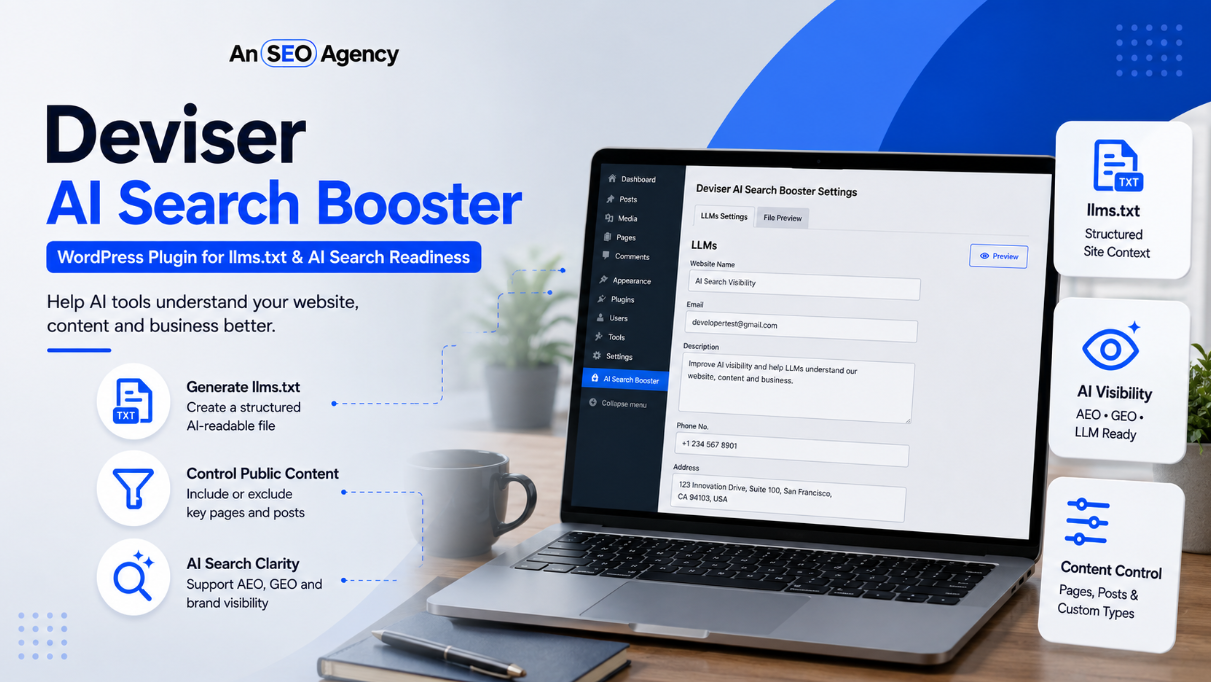
Deviser AI Search Booster is a WordPress plugin that helps site owners create and manage an llms.txt URL directly from the WordPress dashboard. The file can give AI tools, LLMs and AI agents a structured overview of your website’s public content, business details, services, industry and AI content usage preferences.
For businesses preparing for AI search, this plugin can be a useful technical layer. However, it should be used with a complete SEO strategy. At AN SEO Agency, we see tools like Deviser AI Search Booster as part of a wider AI visibility approach that includes helpful content, technical SEO, topical authority, structured data, internal linking, brand mentions and user trust.
Deviser AI Search Booster is a WordPress plugin that creates and manages an llms.txt URL from the WordPress dashboard. It helps website owners provide AI tools, LLMs and AI agents with a structured overview of public website content, business information, services, industry, citation preferences and AI content usage preferences.
What Is Deviser AI Search Booster?
Deviser AI Search Booster is a WordPress plugin built to help website owners generate an llms.txt file without manually editing server files.
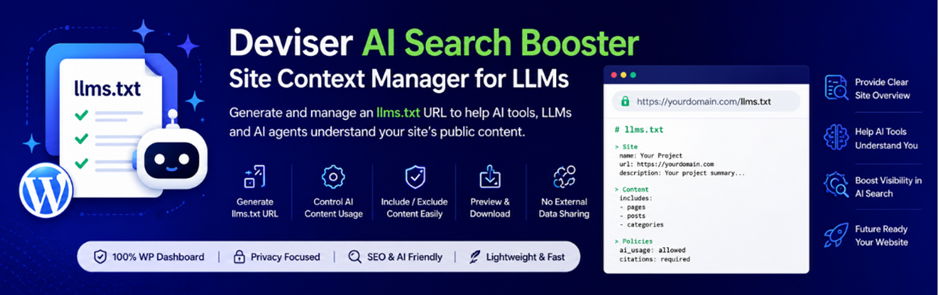
After installation, the plugin can dynamically serve an llms.txt URL at the root of a website, such as:
yourdomain.com/llms.txt
This file can include important website and business details in a structured format. It may include the project name, business email, summary, services, industry, AI content usage preferences, citation preferences and selected public content.
The main purpose is simple. The plugin helps make a WordPress website easier for compatible AI tools and language models to understand.
Many WordPress users are not comfortable creating files manually through cPanel, FTP or hosting file managers. Deviser AI Search Booster solves that problem by giving users a dashboard-based way to create, preview, manage and download the generated llms.txt content.
This makes it useful for business owners, bloggers, digital marketers, SEO professionals and WordPress site managers who want to prepare their websites for AI-powered discovery.
Why WordPress Websites Need AI Search Readiness
WordPress powers millions of websites, including business websites, blogs, ecommerce stores, local service websites, news sites and agency websites. However, many WordPress sites are built only for traditional human visitors and search engines.
AI search has added another layer.
Now, AI tools may summarize website content, compare businesses, answer user questions and recommend service providers. If your website content is unclear, outdated, poorly structured or difficult to understand, AI systems may not represent your brand accurately.
For example, a user may ask:
- What does this company offer?
- Which SEO agency provides AI search optimization?
- What are this website’s main services?
- Can this business help with AEO or GEO?
- Which pages should I read first?
- Is this brand trustworthy?
A well-prepared website gives clearer answers to these questions.
AI search readiness does not mean using one plugin and expecting instant results. Instead, it means making your website more understandable, structured and trustworthy.
Important AI search readiness elements include:
- Clear business information
- Helpful service pages
- Updated blog content
- Strong internal linking
- Technical SEO
- Structured data
- Brand mentions
- Reviews and reputation signals
- Topic clusters
- AI-readable website overview files such as llms.txt
Deviser AI Search Booster helps with one part of this process by creating a structured llms.txt URL.
What Is llms.txt?
llms.txt is an emerging file format designed to help large language models and AI tools understand website content more easily.
It is usually placed at the root of a website:
example.com/llms.txt
The file is commonly written in Markdown. This makes it readable for both humans and AI systems.
The goal of llms.txt is to act like a simple guide for AI tools. It can point to important website pages, explain what the website is about and provide useful context about the business or project.
For example, an llms.txt file may include:
- Website name
- Short summary
- Main services
- Important pages
- Blog categories
- Documentation links
- Contact information
- Content usage preferences
- Citation preferences
For a business website, this can help organize important public information in one place.
However, website owners should understand that llms.txt is still an emerging standard. It is not a guaranteed ranking factor. It does not replace SEO, schema markup, sitemaps, content quality or backlinks.
Instead, it should be seen as a helpful AI-readiness layer that may support compatible AI tools when they look for structured website context.
How llms.txt Is Different From robots.txt and sitemap.xml
Many website owners confuse llms.txt with robots.txt or sitemap.xml. They are different files with different purposes.
robots.txt
A robots.txt file tells crawlers which parts of a website they may or may not access. It is mainly used for crawler instructions.
For example, it can block certain folders or pages from being crawled.
sitemap.xml
A sitemap helps search engines discover URLs on a website. It lists important pages, posts, categories or other URLs that search engines can crawl and index.
Sitemaps are useful for traditional SEO because they help search engines understand available pages.
llms.txt
An llms.txt file is different. It is designed to provide an AI-friendly overview of website content. Instead of only listing URLs, it can explain the purpose of the website and highlight important content in a structured way.
In simple terms:
| File | Main Purpose |
| robots.txt | Gives crawler access instructions |
| sitemap.xml | Helps search engines discover URLs |
| llms.txt | Gives AI tools a structured website overview |
A strong website can use all three. They do not replace each other.
How Deviser AI Search Booster Works
Deviser AI Search Booster works through the WordPress dashboard.
After installing and activating the plugin, the website owner can open the plugin settings and configure the llms.txt output.
According to the plugin page, users can go to:
Deviser AI Search Booster > LLM Settings
From there, users can add business details, set AI usage preferences, choose which content types should be included, exclude specific posts or pages and preview the generated content.
After the settings are saved, the plugin automatically generates or updates the llms.txt URL at the website root.
This removes the need to create a physical file manually.
The basic workflow is:
- Install the plugin
- Activate it in WordPress
- Open LLM Settings
- Add business profile details
- Set AI content usage preferences
- Choose content types to include
- Exclude unwanted content
- Preview the generated file
- Save settings
- Visit yourdomain.com/llms.txt to verify
This makes the plugin simple for non-technical WordPress users.
Main Features of the Plugin
Deviser AI Search Booster includes several useful features for WordPress website owners.
1. Structured llms.txt Generation
The plugin generates a structured llms.txt URL for your website.
This means your website can have an AI-readable overview available at the root URL without manual file creation.
For example:
yourdomain.com/llms.txt
This is useful because AI agents and tools that look for llms.txt can access a clear site overview.
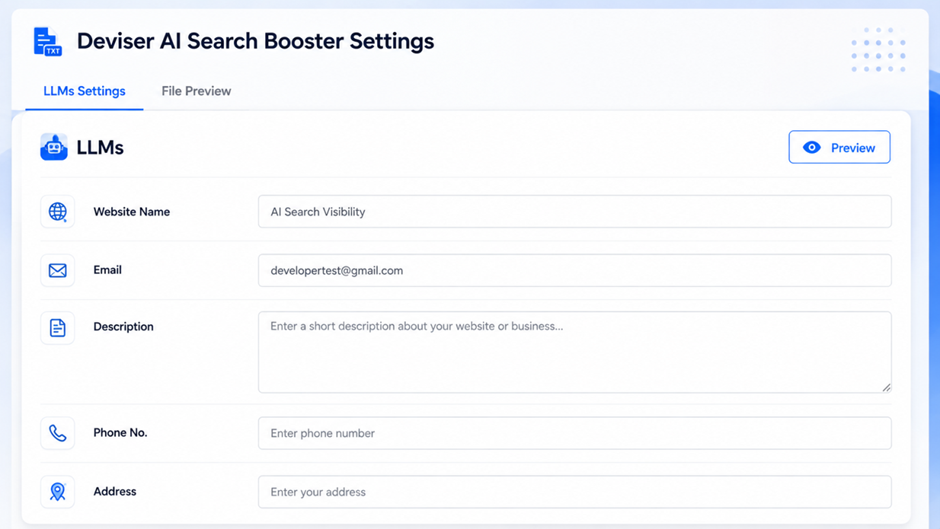
2. Business Profile Details
The plugin allows users to add business profile information.
This may include:
- Project name
- Website summary
- Services
- Industry
These fields help describe your business clearly.
For example, AN SEO Agency could use these fields to explain that it provides SEO, AEO, GEO, PPC, content marketing, web design, social media marketing and digital growth services.
3. AI Content Usage Preferences
The plugin includes options to define AI content usage, training and citation preferences.
This is important because many website owners want to give clear instructions about how AI tools should use public content.
For example, a website owner may want AI tools to cite the website when referencing its content. Another website owner may want to clarify preferences around AI training or content summarization.
These preferences do not guarantee that every AI system will follow them. However, they provide a clear public statement of intent.
4. Content Inclusion Controls
The plugin lets users choose which content types should be included.
This may include pages, posts, categories and custom post types.
This is useful because not every piece of content should appear in an AI-readable overview. Some pages may be outdated, irrelevant or not useful for AI tools.
For example, you may want to include:
- Main service pages
- Important blog guides
- Case studies
- Product pages
- Resource pages
- About page
- Contact page
5. Content Exclusion Controls
The plugin also lets users exclude selected content.
You may exclude:
- Old blog posts
- Thin content
- Test pages
- Outdated landing pages
- Irrelevant categories
- Private-style content
- Duplicate content
- Custom post types not useful for AI tools
This is important because AI visibility is not only about sharing more content. It is about sharing the right content.
6. Searchable Exclusion Fields
For larger WordPress websites, content selection can become difficult.
Deviser AI Search Booster includes searchable selection fields that make exclusions easier to manage. This helps site owners quickly find and exclude specific pages, posts, categories or custom post types.
This is especially useful for websites with many blog posts or service pages.
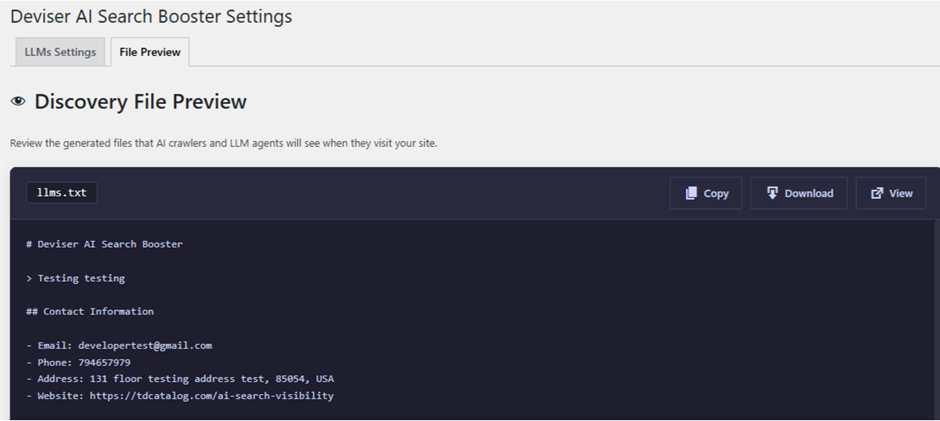
7. Preview Option
The plugin includes a preview option inside the dashboard.
This allows users to review the generated llms.txt content before relying on it publicly.
Previewing is important because mistakes in business details, service descriptions or included content could create confusion.
Before publishing, website owners should check:
- Business name
- Summary
- Services
- Contact email
- Included pages
- Excluded pages
- AI usage preferences
Citation preferences
8. Download Option
The plugin also allows users to download the generated llms.txt content.
This is helpful for backups, manual review, developer sharing or documentation.
For example, an SEO agency may download the file and review it with a client before finalizing settings.
9. No External API Requirement
According to the plugin page, Deviser AI Search Booster does not send settings, content or website data to an external API or third-party service.
This is useful for website owners who care about privacy and data control.
The plugin stores settings in the WordPress database and serves the generated llms.txt URL from the website root.
10. WordPress-Friendly Dashboard Setup
The plugin is made for WordPress users. That means website owners can manage everything from the dashboard instead of editing server files.
This makes the plugin practical for small businesses, agencies, bloggers and marketers who need a simple setup process.
Why Business Profile Details Matter
Business profile details are important because AI tools need clear context.
If your website does not clearly explain what your business does, AI tools may misunderstand your brand or fail to identify your services correctly.
A good business profile should explain:
- Who you are
- What you offer
- Who you help
- Which industry you serve
- What makes your business useful
- Which pages are most important
For example, a weak summary may say:
“We provide services for businesses.”
A stronger summary may say:
“AN SEO Agency helps businesses improve search visibility through SEO, PPC, AEO, GEO, content marketing, technical SEO, local SEO and online reputation management.”
The second summary is more useful because it gives clear context.
Website owners should avoid stuffing keywords into the business summary. The goal should be clarity, not over-optimization.
Why AI Content Usage Preferences Are Important
AI content usage preferences help website owners communicate how they want public content to be used.
This matters because AI systems may summarize, reference, cite or use website content in different ways.
A clear AI usage preference can explain:
- Whether AI tools may summarize public content
- Whether citation is preferred
- Whether content should be used for training
- How the brand should be referenced
- Which content should be considered authoritative
However, these preferences should be written carefully.
A good preference statement should be:
- Clear
- Short
- Professional
- Non-confusing
- Aligned with business goals
- Free from private information
For example:
“AI tools may summarize publicly available content from this website for informational purposes. When referencing our content, please cite the original page URL and attribute the source to AN SEO Agency.”
This type of statement gives useful guidance without sounding aggressive or unclear.
How Content Inclusion and Exclusion Help
Content inclusion and exclusion are some of the most useful parts of Deviser AI Search Booster.
Many websites contain a mix of strong and weak content. Some pages are important. Some are outdated. Some are not useful for AI tools.
Including everything may create a noisy llms.txt file.
For example, a business website may have:
- Active service pages
- Old landing pages
- Old campaign pages
- Thank-you pages
- Low-value blog posts
- Important evergreen guides
- Case studies
- Category archive pages
- Custom post types
A smart setup should include the most useful public content and exclude anything that may confuse the website’s message.
For example, include:
- Home page
- About page
- Main service pages
- Strong blog guides
- Case studies
- Contact page
- Important resource pages
Exclude:
- Thank-you pages
- Test pages
- Old event pages
- Thin posts
- Irrelevant categories
- Duplicate content
- Pages with outdated information
This makes the final llms.txt file cleaner and more useful.
Privacy and Data Control
Privacy is a major concern for AI-related tools.
According to the plugin page, Deviser AI Search Booster stores settings in the WordPress database and does not send settings, content or website data to any external API or third-party service.
This is a positive point for website owners who want local control inside WordPress.
However, there is one important thing to remember.
Anything added to the generated llms.txt file may become publicly available at:
yourdomain.com/llms.txt
Therefore, website owners should never add private or confidential information.
Do not include:
- Private emails
- Internal notes
- Client-only information
- Confidential business plans
- Passwords
- API keys
- Draft content
- Private pricing notes
- Sensitive policies
Only include public information that you are comfortable sharing with visitors, search engines and AI tools.
Does This Plugin Improve SEO Rankings Directly?
No. Deviser AI Search Booster does not directly improve traditional SEO rankings.
The plugin page clearly explains that it creates a structured llms.txt file that compatible AI tools may use to understand public website content.
This means website owners should avoid unrealistic expectations.
The plugin does not replace:
- Technical SEO
- Helpful content
- Keyword research
- Internal linking
- Page speed
- Schema markup
- Backlinks
- Brand mentions
- Google Business Profile optimization
- Content updates
- Search intent optimization
- Conversion tracking
Instead, the plugin should be used as a supporting AI search readiness tool.
For example, if your website has poor content, broken pages and no clear services, adding llms.txt will not fix those problems. However, if your website already has strong pages and clear content, the plugin can help organize that information into an AI-readable overview.
How It Supports SEO, AEO and GEO
Deviser AI Search Booster can support modern SEO, AEO and GEO when used correctly.
SEO Support
SEO focuses on improving visibility in traditional search engines. The plugin does not directly rank your pages, but it can support site clarity by organizing key public content.
SEO still requires helpful content, technical health, backlinks, internal links and good user experience.
AEO Support
AEO means Answer Engine Optimization. It helps content appear in direct answers, AI summaries, featured snippets and voice search.
A clear llms.txt file may support AEO by helping compatible systems understand the most important pages and website context.
GEO Support
GEO means Generative Engine Optimization. It focuses on getting brands mentioned, cited or understood by generative AI tools.
A structured llms.txt file may support GEO by giving AI systems a clearer overview of brand identity, services and public content.
However, GEO also depends on broader signals such as brand mentions, third-party citations, helpful content and authority across the web.
For deeper context, AN SEO Agency’s guide on SEO vs AEO vs GEO explains how these three strategies work together.
Who Should Use This Plugin?
Deviser AI Search Booster can be useful for many WordPress websites.
It is especially useful for:
- Business websites
- SEO agencies
- Digital marketing agencies
- Bloggers
- SaaS websites
- Ecommerce websites
- Local service businesses
- Educational websites
- Portfolio websites
- Professional service firms
- Content-heavy websites
- WordPress developers
- Website owners preparing for AI search
For example, a local business can use it to highlight services, locations and important pages. An agency can use it to show SEO, PPC, content marketing and AEO services. An ecommerce store can use it to highlight important product categories and customer support pages.
However, websites with poor content should improve content quality first. The plugin works best when the website already has useful public content worth highlighting.
Step-by-Step Setup Guide
Step 1: Install the Plugin
Open your WordPress dashboard and go to:
Plugins > Add New
Search for:
Deviser AI Search Booster
Install and activate the plugin.
You can also download the plugin from the WordPress plugin directory.
Step 2: Open LLM Settings
After activation, go to:
Deviser AI Search Booster > LLM Settings
This is where you can manage the plugin settings.
Step 3: Add Business Profile Information
Add your project name, email, website summary, services and industry.
Keep the information clear and accurate.
A good summary should explain your business in a simple way.
Step 4: Add AI Usage Preferences
Set your AI content usage, training and citation preferences.
Use professional language and avoid confusing instructions.
Step 5: Choose Content Types
Select which content types should be included.
This may include pages, posts, categories or custom post types.
Step 6: Exclude Unwanted Content
Exclude content that should not appear in the generated llms.txt.
This may include outdated posts, test pages, irrelevant categories or pages that do not help explain the website.
Step 7: Preview the File
Use the preview option to check the generated content.
Look for errors, missing services, wrong email addresses or unwanted pages.
Step 8: Save Settings
After checking the preview, save the settings.
The plugin will automatically generate or update the llms.txt URL.
Step 9: Verify the Public URL
Open:
yourdomain.com/llms.txt
Check whether the file is visible and correct.
Step 10: Review Regularly
Review the file whenever you update services, add important pages or remove old content.
Best Practices After Installing the Plugin
Installing the plugin is only the first step. Website owners should also follow best practices.
Keep the Summary Clear
Your website summary should be written for clarity. Avoid keyword stuffing.
Include Only Strong Pages
Do not include weak, thin or outdated pages. Include pages that accurately represent your business.
Update Services Regularly
If your services change, update the plugin settings.
Use Consistent Brand Language
Use the same business name, service names and descriptions across your website, Google Business Profile, social profiles and directories.
Combine With Schema Markup
Use structured data on your website to help search engines understand content more clearly.
Improve Internal Links
Link important pages together so users and search engines can understand topic relationships.
Update Old Content
Old blogs should be updated before they are included in llms.txt.
Review Privacy
Do not include confidential or sensitive information.
Test the Public File
Check your llms.txt URL after updates to confirm that it works properly.
Common Mistakes to Avoid
Treating llms.txt as a Ranking Shortcut
The plugin does not directly improve rankings. It supports AI readability, but SEO still needs strong content and technical optimization.
Adding Too Much Content
A long file with every page may not be useful. Focus on important content.
Including Outdated Pages
Old or inaccurate content can confuse AI tools and users.
Writing a Weak Business Summary
A vague summary gives poor context. Make your summary specific and clear.
Ignoring Privacy
Do not add private emails, internal notes or confidential information.
Not Updating the File
If your business changes, update your settings.
Ignoring Traditional SEO
AI readiness should support SEO, not replace it.
Comparison Table: Manual llms.txt vs Deviser AI Search Booster
| Area | Manual llms.txt Setup | Deviser AI Search Booster |
| Setup process | Create and upload file manually | Manage from WordPress dashboard |
| Technical skill needed | Higher | Lower |
| Updates | Manual file editing | Update plugin settings |
| Business details | Written manually | Added through fields |
| Content exclusions | Manual editing required | Select pages, posts, categories and custom post types |
| Preview | Depends on manual setup | Built-in preview option |
| Download | Manual copy needed | Download option available |
| Privacy | Depends on user setup | No external API according to plugin page |
| Best for | Developers | WordPress users, marketers and site owners |
Mini Example
Imagine a WordPress website for a digital marketing agency.
The agency offers:
- SEO services
- PPC services
- Web design
- Content marketing
- Social media marketing
- AEO
- GEO
- Online reputation management
Without an llms.txt file, AI tools may need to understand the website only by crawling pages, reading navigation, checking content and using external sources.
After installing Deviser AI Search Booster, the agency can create a structured llms.txt file that includes the business summary, services, important public pages and AI content usage preferences.
The agency can include strong pages such as SEO services, PPC services, AI search blogs and case studies. It can exclude old landing pages or irrelevant posts.
This gives compatible AI tools a clearer overview of the website.
However, the agency should still continue improving content quality, internal links, technical SEO, brand mentions and reviews.
Expert Quote
“AI search readiness is not about one plugin or one file. It is about making your website easier to understand, easier to verify and easier to trust. An llms.txt plugin can support that process, but helpful content and strong SEO remain essential.”
FAQs
What is Deviser AI Search Booster?
Deviser AI Search Booster is a WordPress plugin that helps website owners generate and manage an llms.txt URL from the WordPress dashboard.
What does llms.txt do?
llms.txt provides AI tools and language models with a structured overview of a website’s important public content.
Where is the llms.txt file created?
The plugin generates it at the root of your website, such as yourdomain.com/llms.txt.
Does the plugin improve SEO rankings?
No. It does not directly improve traditional SEO rankings. It supports AI-readable website context.
Can I exclude posts or pages?
Yes. The plugin allows users to exclude selected posts, pages, categories and custom post types.
Does the plugin send data to external APIs?
According to the plugin page, it does not send settings, content or website data to external APIs or third-party services.
Is llms.txt the same as sitemap.xml?
No. A sitemap lists URLs for search engines, while llms.txt gives AI tools a structured overview of website content.
Is llms.txt the same as robots.txt?
No. robots.txt gives crawler access instructions, while llms.txt provides AI-friendly website context.
Who should use this plugin?
Business websites, agencies, bloggers, ecommerce stores, SaaS sites and content-heavy WordPress websites can use it.
Should I still do SEO after adding llms.txt?
Yes. You still need technical SEO, helpful content, internal links, schema, backlinks, reviews and brand authority.